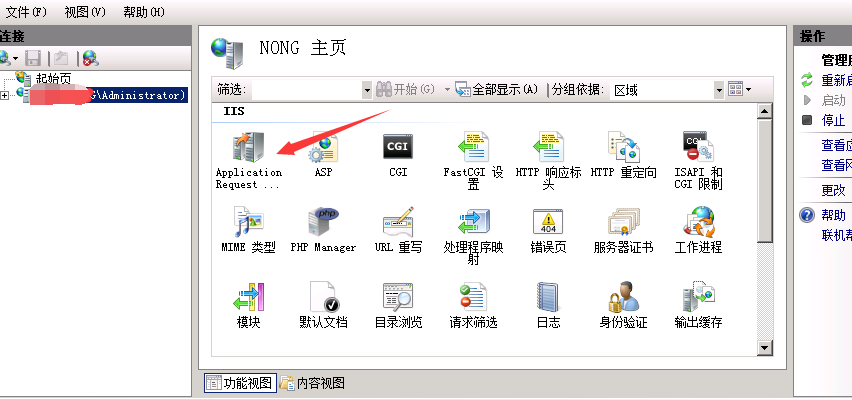
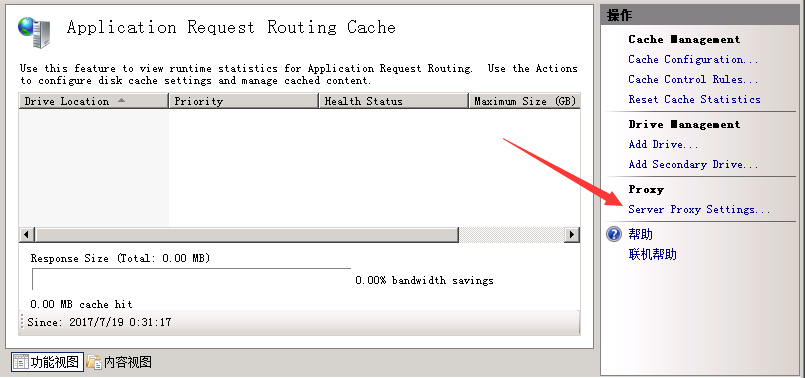
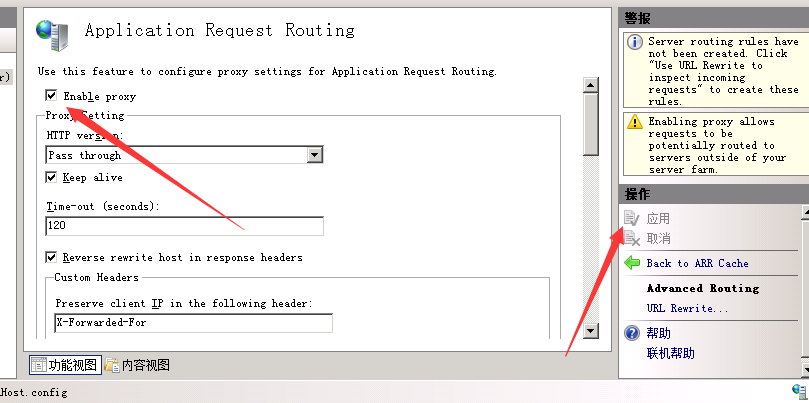
目的:把A站当做B站二级目录 如: http://www.baidu.com等于/baidu/ http://www.qq.com等于http://www.6ke.com.cn/qq/ 1、安装64位URLIIS7重写rewrite 下载地址为:http://www.iis7.com/uploads/soft/180609/rewrite_x64_zh-CN.zip 2、安装requestRouter_amd64.msi 下载地址为:http://www.iis7.com/uploads/soft/180609/requestRouter_amd64.zip 3、以下为规则保存在记事本重命名为web.config。放网站根目录: <?xmlversion="1.0"encoding="UTF-8"?> <configuration> <system.webServer> <rewrite> <rules> <rulename="OrgPage"stopProcessing="true"> <matchurl="^baidu(.*)$"/> <actiontype="Rewrite"url="http://www.baidu.com/{R:1}"/> </rule> <rulename="OrgPage4"stopProcessing="true"> <matchurl="^qq(.*)$"/> <actiontype="Rewrite"url="http://www.qq.com/{R:1}"/> </rule> </rules> </rewrite> <defaultDocument> <files> <clear/> <addvalue="index.html"/> <addvalue="1.html"/> <addvalue="index.php"/> </files> </defaultDocument> </system.webServer> </configuration> 4、找到aRR如下图依次点击 代码说明: <rulename="随意写必须不重名"stopProcessing="true"> <matchurl="^网站本地二级目录名(.*)$"/> <actiontype="Rewrite"url="被调用网站或者被调用网站二级目录名{R:1}"/> </rule> 大功告成啦 |